Featured Post Today
print this page
Latest Post
Showing posts with label Info. Show all posts

30 Amazingly Realistic 3D Animal T-shirt Design

3D Animal T-shirt Design
This post will showcase some amazing examples of 3d t-shirt design. This is the most unique t-shirt designs and the coolest I have ever come across, if you previously have often find ordinary t-shirt design, maybe this time you will be surprised, because These t-shirts design are so live, they look very real.

It is intended as the latest digital art of screen printing equipment as well as some advances in the printing world. You can just take your cat photo to be made into this kind of t-shirt. These t-shirts are so realistic, I guess it will be easily to get attention with those t-shirt on your body. Enjoy!

30 Amazingly Realistic 3D Animal T-shirt Design


3D Animal T-shirt Design

3D Animal T-shirt Design

3D Animal T-shirt Design

3D Animal T-shirt Design

3D Animal T-shirt Design

3D Animal T-shirt Design

3D Animal T-shirt Design

3D Animal T-shirt Design

3D Animal T-shirt Design

3D Animal T-shirt Design

3D Animal T-shirt Design

3D Animal T-shirt Design

3D Animal T-shirt Design

3D Animal T-shirt Design

3D Animal T-shirt Design

3D Animal T-shirt Design

3D Animal T-shirt Design

3D Animal T-shirt Design

3D Animal T-shirt Design

3D Animal T-shirt Design

3D Animal T-shirt Design

3D Animal T-shirt Design

3D Animal T-shirt Design

3D Animal T-shirt Design

3D Animal T-shirt Design

3D Animal T-shirt Design

3D Animal T-shirt Design

4 important things in slicing Web graphics

4 important things in slicing Web graphics
In the field of website design (interface), there are some things you will find that which is different from print design. If you are a graphic designer who is familiar with print design but want to try the field of website design or interface, you'll probably find some unusual technical terms. One of them is Slicing web pages.

What Is Slicing?

Slicing is a technique of cutting the pictures or designs on the website, breaking them into pieces and then put back together using CSS and HTML code. Why these should be break into several parts? a website display that looks intact is not the same as when you see a brochure that is really a complete printout of a design.

All the elements (images, design) emerged from the results of image pieces when slicing. They can be seen when you click on 'save as Web Complete' you will find a folder that contains the pieces of the image. That's the result of slicing. Slicing techniques can certainly speed up the process of downloading the website in parallel, but keep in mind also for not too much make the slice, because it can actually slow the downloading time due to limited number of parallel downloads on the browser.

4 important things in slicing Web graphics

slicing is the process of dividing a single 2D user interface composition layout (comp) into multiple image files (digital assets) of the graphical user interface (GUI) for one or more electronic pages. It is typically part of the client side development process of creating a web page and/or web site, but is also used in the user interface design process of software development and game development.

The process involves partitioning a comp in either a single layer image file format or the multi-layer native file format of the graphic art software used for partitioning. Once partitioned, one would save them as separate image files, typically in GIF, JPEG or PNG format in either a batch process or one at a time. Multi-layered image files may include multiple versions or states of the same image, often used for animations or widgets.

source:wikipedia


4 important things in slicing Web graphics


1. Crop tool / Slice tool


4 important things in slicing Web graphics

4 important things in slicing Web graphics

Each designer has its own ways and tactics and in doing different projects. That's fine, the important thing is that we can work fine in a timely manner. Slicing techniques in Photoshop can be done using the Slice tool or manually with the Crop tool. I personally prefer the crop tool. If using a slice tool, you can indeed be automatically cut off some parts at once in one 'slice' and instantly save for web in a single folder for all files of these pieces.

But this will make it difficult if the file is a transparent file which is lay on a background. Well, could it still be done, but it would be easier for the programmer if we split up the image files with transparent background. Well, it still can be done, but would not that be much easier for the programmer if you split up the transparent image file from its background? :)

2. slicing the tips and middle of the background


For slicing a field, for example in the background or on a curved corner box (with a rounded rectangle) certainly has a way to cut each. If to be cut is a field box, eg for background writing with pointed toes then you just need to thin cut on one part only.

4 important things in slicing Web graphics

4 important things in slicing Web graphics

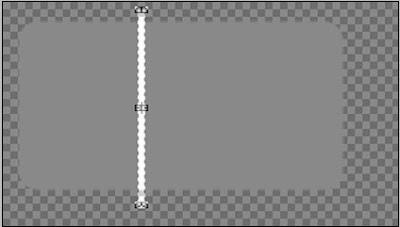
Meanwhile, if the area to be cut has curved corners, you just need to cut on the tip of the left-right or top down (depending on the direction of the effect of gradation if any) and the center.
4 important things in slicing Web graphics

4 important things in slicing Web graphics

4 important things in slicing Web graphics

Why just need to cut or thin like that and that's only 3 parts? Because later on when you want to create a code (html / css), if the same field and the texture or without texture, the code will unite with the repeat result is the center piece (either vertical or horizontal direction). In contrast, if the image is an image or texture that is not evenly distributed, of course you can not use the 'repeat' code, which causing messy result.

3. Gradation Slicing


As discussed earlier, the slicing technique for graded fields depend on the direction of gradation. Horizontal or Vertical. If it is horizontal with a curved tip, then you cut the tip of the left, center and right end.

But if it is vertical with a curved edge, the part that you need to cut is the tip top, middle and lower end. Let the programmer to repeat its middle course. Let the programmers who repeated the middle. The figure below is an example of a pointed tip, so it only needs one piece only, the programmers who will repeat it later.

4 important things in slicing Web graphics

4 important things in slicing Web graphics

4 important things in slicing Web graphics

4 important things in slicing Web graphics

4. Folder Naming


For slicing files naming, its important to remember that you can not use spaces, for example, you're going to name an image with '05 ', then you should name it with'image05'or 'image_05'. Because the HTML code can not read files that using spaces on it's name. Its better to use a numbering or alphabetical order to ease the programmer when opening the these file, especially for a sequence file. All must be in one folder only, not separate nor a folder within a folder.

4 important things in slicing Web graphics

Conclusion


At first, to the designer who is unfamiliar in terms of slicing, may be confused about where to start, or what should be dislicing. For the slicing process is only required graphics software, for those of you who are familiar with graphics software certainly had no difficulty during the process of slicing.

If you have difficulties to determine the slicing, you better to discuss it with your programmer / coder, because they who later received the results of your slicing and then put them together into a whole web page.

Casio Showcase 3D Printing Technology

Casio Showcase 3D Printing Technology
3D printing application seems to start developing in all fields, Casio also want to get involved to showcase the latest example of 3D printing technology at CES 2012 in Las Vegas (January 9 to 13).

Casio 3D artwork Gallery created based on a 2D image and then developed by 3D printing technology. For now there are two kinds, namely, textured-painting (relief) as in the example image above, where the texture of the painting is very smooth. The second is a 3D digital painting as in the example image below. You can see how Casio's technology is a big leap in the use of 3D printing technology into the realm of art. A hard copy is even nearly approaches the form of preserved animals.

3D printing technology from Casio is not yet released in the market even though they are indeed planning to release it in the near future. For now maybe you can start collecting your favorite photos if you are interested in this Casio technology.

Casio Showcase 3D Printing Technology

Casio Showcase 3D Printing Technology

Casio Showcase 3D Printing Technology

Logo Design Brief

Logo Design Brief
Brief in logo design is like a flashlight in the dark, it must be turned on so that we can work quickly and safely. Brief was created for designers and clients can stay focused on the primary goal of designing a logo. Without a design brief, the project
being undertaken would be detrimental to both parties, both designer and client. Designers will work on something that may be beyond the client's expectations and goals, so it will result in a prolonged revision. As for clients, the expected goals of the logos that are designed to be beyond estimate.

Logo Design Brief

So what can be asked in the design brief?


Each designer must have their own points when formulating a brief for the design. Nothing is absolute in this case, all depending on needs and projects. Maybe in general you who have never worked using the material of the brief to design a logo, can get a brief overview of the material below:

1) Basic information about the company name, or what should be incorporated into the logo? What is the advantage (plus point) of the company and what its vision and mission?

Logo Design Brief

Contains basic questions about the entities that want a logo design. Start of content you need to include in a logo, to excellence and vision and mission. Through this question, designers try to identify the characteristics of the company to be able to conclude what steps to be prepared to begin the design process.

2) What is the purpose of the project? Is it because of competition, product identification, or enhance corporate image?

Logo Design Brief

This question aimed to know the goals of the project to design a logo. What are the targets to be achieved through the client's new logo? By knowing the target / goal, then the designer has to know the opposite. Just how to strategize in order to output the design to be maximal and in accordance with what is expected.

3) Who are customers of the company? example: age, gender, occupation, socio / economic, employment, etc.. Did they already know about the product or service from the Company? name some company which are quite familiar to them?

Logo Design Brief

This point is one vital part that must be included in the brief material. Basically, all logos aims to identify, recognize, and make connections between the target with the company. It is important to recognize the target consumers before designing. The aim is that the logo can be appropriately designed with appropriate targets.

4) Who are the competitors of the company? How different company from its competitors?

Logo Design Brief

This point was focused on the competition on the market the company's sales. If the company turns out to have competitors, then it takes a strong differentiation between the client company with its competitors, this is one of the main tasks for the designers of the logo.

5) Are there any consideration of production? example: the logo should look good in the conditions of one color, especially when printed on the shirts. What are the media used to distribute the logo? (Print, web, etc.)

Logo Design Brief

One of the aspects that affect the success or failure of a logo is very determined to how consistently the logo is applied / used. Talk about the use then we will talk about the media that will be used to display the logo. Consideration of production must first be considered by the designer before starting the design process.

6) Do you find some logos that interests you? Could you explain why?

Logo Design Brief

It is important to know the taste of a client before starting to design the logo. Sometimes, clients taste and aesthetic considerations may be the final determinant of a design project.

7) Is there something specific that should be remembered by the audience after seeing the logo?

Logo Design Brief

Sometimes some companies have their own 'selling points', it's such a characteristic that distinguishes it from others. And often clients want the 'selling points' to be more emphasized. The task for designers is to combine 'selling points' with the overall information gained from the brief without disturbing (or even destroy) the overall design process.

That's It!


This material is only a general idea of how to gather information in designing the logo through the brief. You can develop your own with a better version. I hope this will be usefull.
 
Support : Creating Website | Johny Template | Mas Template
Copyright © 2011. Tutorials Blogger - All Rights Reserved
Template Created by Creating Website Published by Mas Template
Proudly powered by Blogger